2026 · Product产品
Inkleaf — Markdown to PDF, with Math and Code IntactInkleaf:把 Markdown 转成 PDF,公式和代码完整保留
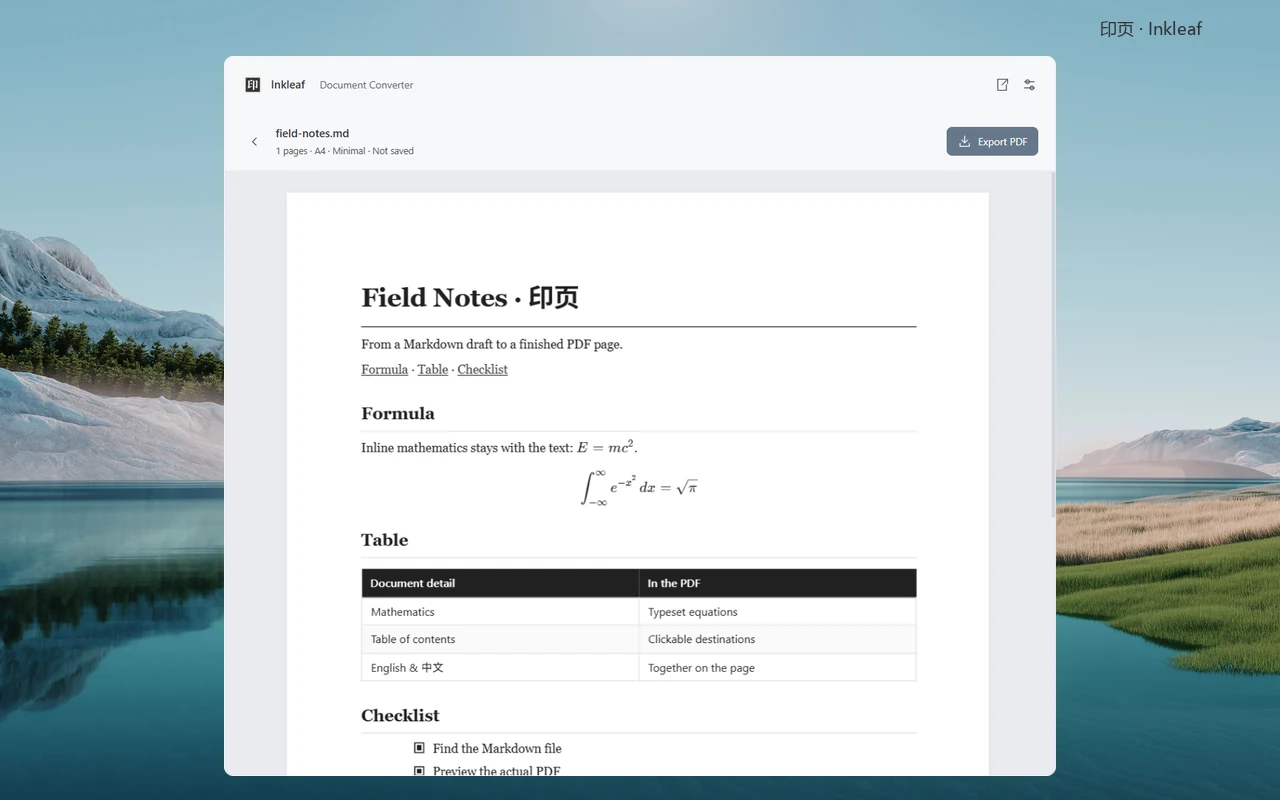
A Windows desktop app that turns Markdown into PDF. I write almost everything in Markdown, and the converters I tried never handled math formulas and code perfectly, so I built my own. Press a shortcut, find the file, check the real pages and export. Everything runs locally, and the source file is never changed.一款把 Markdown 转成 PDF 的 Windows 桌面应用。我几乎所有东西都用 Markdown 写,但试过的转换工具没有一个能把数学公式和代码处理得完美,所以我自己做了一个。按下快捷键、找到文件、检查真实的页面效果,然后导出。全部在本地运行,源文件不会被改动。
- Median search query over 100,000 indexed files在 10 万个已索引文件中搜索的中位耗时
- 23 ms23 ms
- Current release当前版本
- 0.6.10.6.1
- For personal use个人使用
- Free免费
Why I built it
I love writing in Markdown and use it for almost everything, from research notes to project READMEs. Sometimes I need a PDF of it.
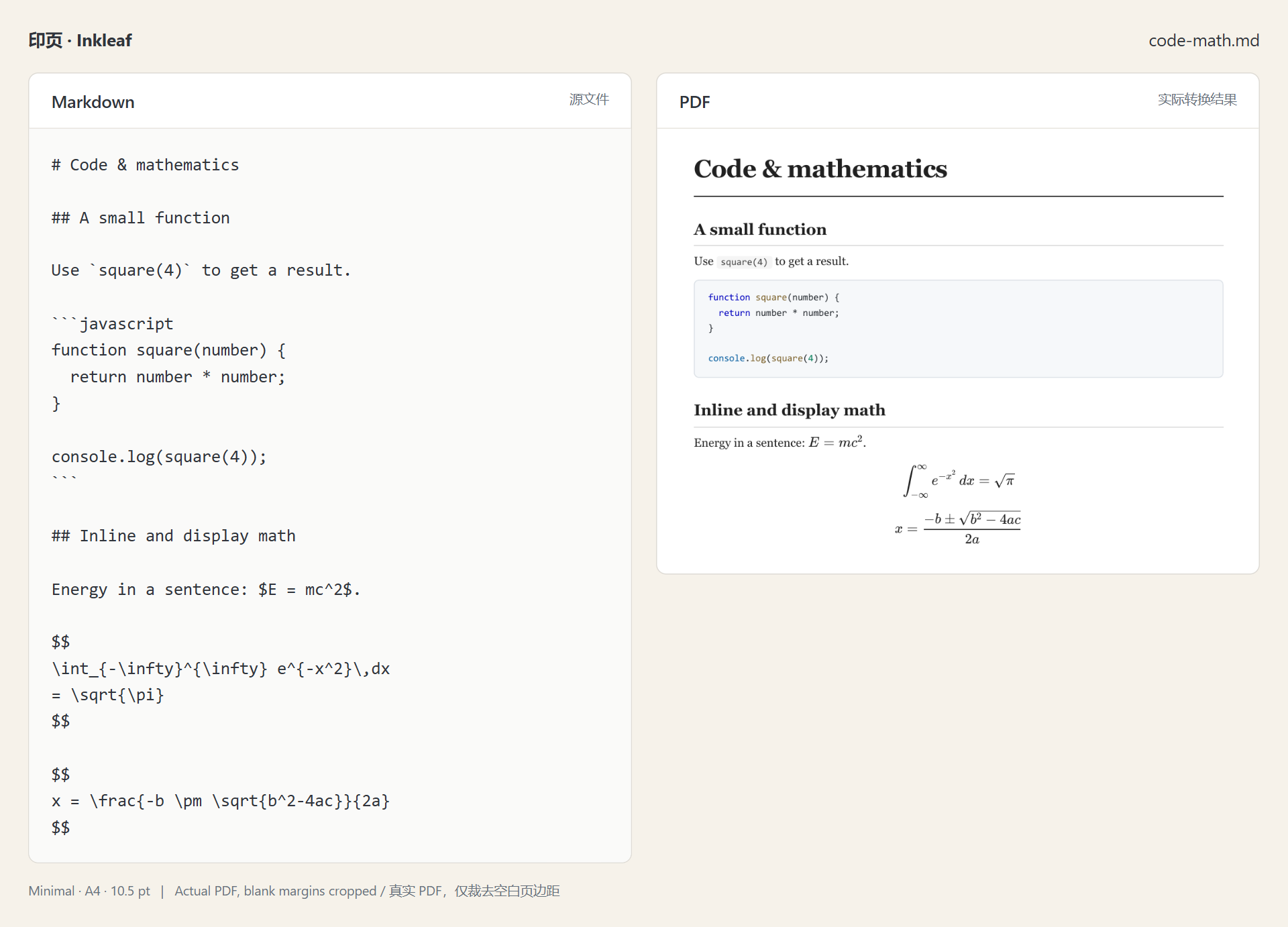
The converters I tried were close, but not perfect. Math formulas and code were where they slipped most, and I couldn’t count on them coming out right. So I decided to build my own.
为什么要做它
我很喜欢用 Markdown 写东西,从研究笔记到项目说明,几乎都用它。有时候需要把它转成 PDF。
我试过的转换工具都差一点。数学公式和代码最容易出问题,我没法保证每次都能正确显示。所以我决定自己做一个。
What it does
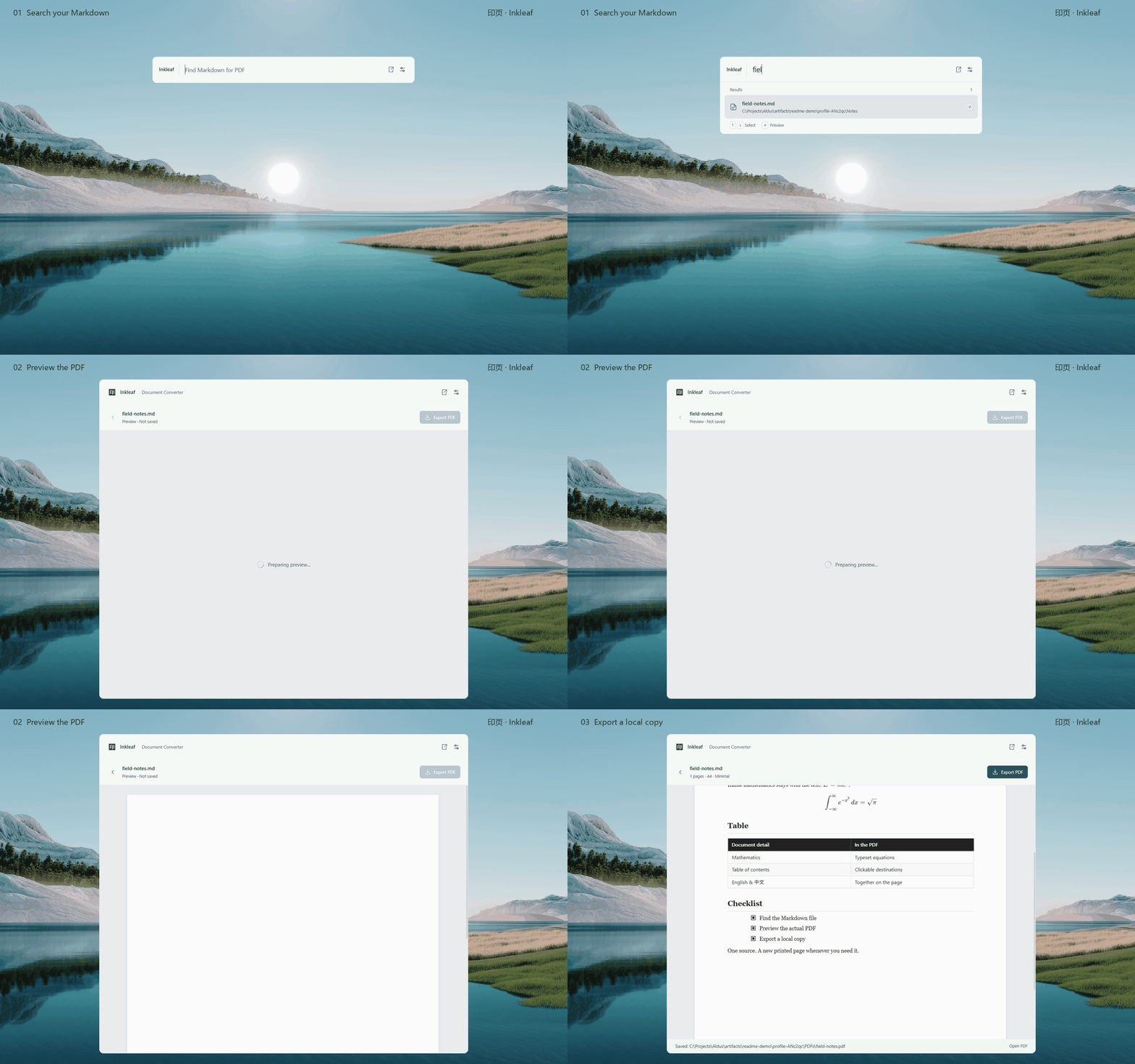
Press Ctrl + Shift + Space anywhere in Windows and a search bar appears. Type part of a file name, pick the file, and Inkleaf shows the real PDF pages before anything is saved. Export writes exactly the PDF you just checked.
它能做什么
在 Windows 任何地方按 Ctrl + Shift + Space,就会弹出一个搜索栏。输入文件名的一部分,选中文件,Inkleaf 会在保存之前先显示真实的 PDF 页面。导出的就是你刚才看到的那份 PDF。
- Math is typeset with KaTeX, and code keeps its indentation and syntax colours, with optional line numbers in the Modern theme.
- Tables, images, footnotes, task lists and callouts all carry over.
- English, Chinese and mixed text work, and the default Modern theme bundles its fonts, so documents convert offline.
- Three themes, A4 or Letter, and settings for typography, headers and footers.
- A whole folder can be converted in one go.
- It all runs on your own computer. There’s no account and no upload, and the Markdown file is never changed.
How it works
Markdown-it turns the file into HTML, KaTeX typesets the math, and images are embedded. A hidden Chromium window prints the page to PDF, and PDF.js shows the result in the preview.
Search runs in a background thread over an index of file names kept in memory, so typing never waits on the disk. In a test with 100,000 Markdown files, the median query took about 23 ms.
Making sure the PDF is right
A page can look fine as HTML and still break when it’s printed, so the tests check the PDF itself. They render a set of test documents in all three themes and confirm that every line of code and every table row made it into the PDF, that no text runs off the page, and that links land where they should. When something can’t be rendered, such as a missing image or a Mermaid diagram, the preview shows a notice with the reason. Bugs found in real documents are turned into small test documents, so they stay fixed.
Where it is now
Version 0.6.1 is out for Windows and free for personal use. Mermaid diagrams and Obsidian wiki links aren’t supported yet, and there’s no Mac version so far.
- 数学公式用 KaTeX 排版,代码保留缩进和语法高亮,Modern 主题下还可以显示行号。
- 表格、图片、脚注、任务列表和提示框都能完整转换。
- 支持英文、中文和中英混排。默认的 Modern 主题自带字体,所以可以离线转换。
- 提供三种主题,可选 A4 或 Letter 纸张,还能设置字体排版、页眉和页脚。
- 可以一次转换整个文件夹。
- 全部在你自己的电脑上运行,不需要账号,不上传文件,也不会改动 Markdown 源文件。
工作原理
Markdown-it 先把文件转成 HTML,KaTeX 排版公式,图片直接嵌入。然后由一个隐藏的 Chromium 窗口把页面打印成 PDF,再用 PDF.js 显示在预览里。
搜索在后台线程里进行,查的是保存在内存中的文件名索引,所以打字时不用等硬盘。在 10 万个 Markdown 文件的测试中,查询耗时的中位数约为 23 毫秒。
确保 PDF 是对的
一个页面作为 HTML 看起来没问题,打印出来也可能出错,所以测试直接检查 PDF 本身。测试会用三种主题渲染一组测试文档,确认每一行代码、每一行表格都进了 PDF,没有文字超出页面,链接也都跳到正确的位置。遇到无法渲染的内容,比如缺失的图片或 Mermaid 图表,预览里会提示原因。在真实文档里发现的问题,会被做成小的测试文档,确保修好后不再出现。
目前的状态
0.6.1 版本已经发布,支持 Windows,个人使用免费。Mermaid 图表和 Obsidian 双链目前还不支持,暂时也没有 Mac 版本。